Specify a custom laptop bag with a measurable fitting brief
A useful custom laptop-bag brief describes a protected computer, a complete load and the actions the owner needs to perform. “Fits a 14-inch laptop” leaves the maker guessing about body dimensions, the sleeve, the entrance and the space occupied by accessories. Measure those things before choosing pocket positions or decorative details.
A report in The Gadgeteer dated 15 April 2010 described Renaissance Art laptop bags with customization options. That establishes historical context for this page, not an active ordering service, current prices or compatibility with today’s computers. The method below can be used with a maker whose present service you have verified.
Identify the device and its transport configuration
A screen diagonal does not describe the computer’s outside width, depth or thickness. For a concrete example, Apple’s specification for the 14-inch MacBook Pro introduced in 2023 lists a body width of 31.26 cm and depth of 22.12 cm. Those are separate dimensions from the screen-size label. They also do not include a sleeve.
Record the exact computer model and measure it in the state in which it will travel. If a fitted shell or padded sleeve stays on, that protected object becomes the fit reference. Include a projecting sleeve zip, handle or flap where it affects insertion. State whether the computer enters from above, from the side or through a front-opening compartment.
| Object or requirement | Example record | Design consequence |
|---|---|---|
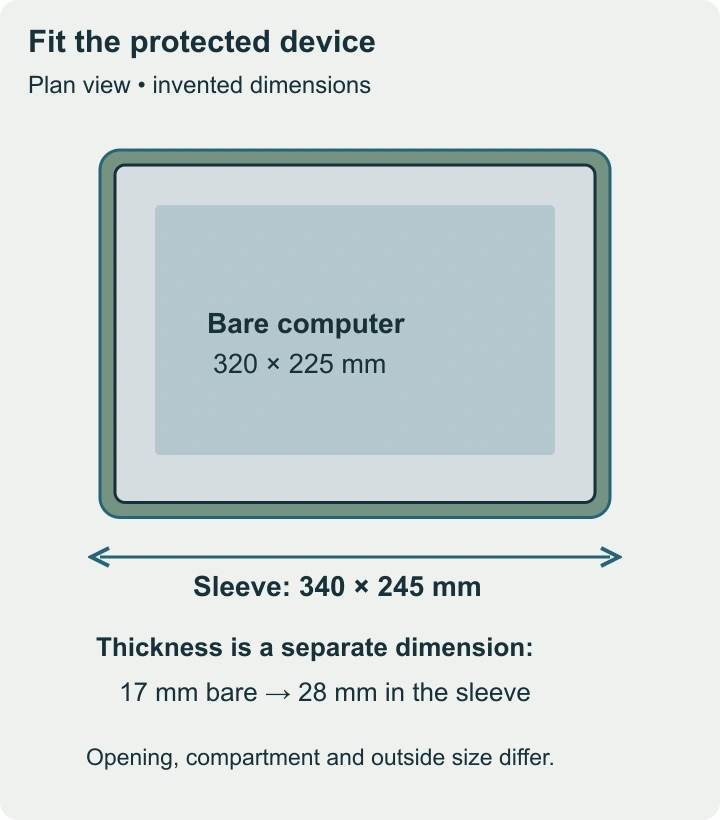
| Bare computer | 320 × 225 × 17 mm. | Identifies the device; not the final compartment requirement. |
| Normal protective sleeve | 340 × 245 × 28 mm outside. | This is the object that must enter and sit inside. |
| Insertion | 340 mm edge across a top opening. | Opening width and corner clearance need confirmation. |
| Access priority | Remove the sleeve without removing the charger. | Accessory placement cannot obstruct that route. |
| Carry arrangement | Handle and shoulder strap, with normal loaded kit. | Both arrangements need an acceptance trial. |
The example does not prescribe a universal clearance. A flexible leather sleeve, a padded compartment and a rigid protective shell behave differently. Give the maker the measured object and ask for the usable opening and interior they propose around it.
Keep three sets of dimensions separate
The first set belongs to the protected device. The second describes the usable compartment after lining, padding and seams. The third describes the finished bag outside. A dimension on a drawing is not useful until you know which set it belongs to.
Imagine an exterior height of 280 mm with construction occupying 12 mm at both the top and bottom. The simplified remaining height would be 256 mm. That does not prove that a 245 mm object has comfortable clearance: a curved base, a closure or a loaded pocket may still intrude. The arithmetic only shows why external dimensions cannot be copied directly into a fit guarantee.
Ask the maker to identify the narrowest point along the insertion route and the usable closed profile. A sleeve may pass through an open bag but prevent the flap from closing. Conversely, a generous interior can sit behind a restrictive zip entrance. Both states matter.
Draw the loaded arrangement before adding pockets
List each regular item and its access priority. Distinguish a charger carried every day from a travel adapter used twice a year. If every possible object is treated as permanent, a compact daily bag can become unnecessarily bulky.
Hard accessories should have a location that does not depend on pressing them against the computer. An internal pocket can consume the very clearance you intended to reserve. Show the pocket loaded with its intended object on the drawing; a flat pocket outline hides that effect.
| Action | Required result | What to check on the drawing |
|---|---|---|
| Take the computer out at a desk. | The protected device exits while other items remain packed. | No loaded pocket projects into the entrance. |
| Find a notebook during a meeting. | It can be removed without disturbing the computer compartment. | A separate route and enough height for its cover. |
| Retrieve a phone while standing. | The phone has a known, reachable position. | Closure, orientation and retention suit the intended use. |
| Put away a charger. | The plug and cable have room without forced compression. | The drawn pocket has real depth, not just width and height. |
Include the empty bag’s weight in the carried total. If a proposed arrangement weighs 1.1 kg before a hypothetical 1.6 kg computer, 0.35 kg charger and 0.45 kg of other items, the total is 3.5 kg. This is a planning example, not a safe-load recommendation or a statement about a particular bag. It helps you decide whether every requested feature earns its weight.
Use a mock-up to resolve geometry
A three-dimensional cardboard dummy can communicate the protected device’s shape without sending the computer to the workshop. Make it to the agreed outside dimensions and include projections. Label its dimensions and orientation directly on it. A thin board cut to the computer’s footprint omits the thickness that may cause the fit problem.
For a pocket layout, mock up the charger and other rigid accessories too. Place them in the proposed positions and check the path of the largest object. This can reveal a conflict before the leather is cut.
The mock-up answers fit questions within its accuracy. It cannot demonstrate padding performance, resistance to a drop or how a loaded strap feels. Ask the maker which aspects still require a prototype or a fitting with the actual contents, and record the answer.
Describe protection as a requirement with evidence
“Protective” can mean separation from scratches, cushioning during ordinary handling, resistance to rain or a tested impact claim. Ask which meaning is intended. A custom fit alone verifies none of those performance claims.
If a separate protective sleeve supplies part of the protection, keep that division explicit. The bag must accommodate the sleeve and keep its opening accessible. Do not remove the sleeve merely to make a failed fitting pass unless you have consciously changed the protection plan.
Ask how closures and hardware are separated from the computer compartment, whether water-resistant claims apply to seams and openings, and what care is required. Request the maker’s actual evidence and limits instead of translating a leather grade or a thick appearance into a performance rating.
Freeze the brief before irreversible customization
Give the drawing a version and a date. Record the device, sleeve, accessory list, compartment dimensions, pocket arrangement and personalization. A later change to one of these may affect several others. Adding an internal organizer can reduce clearance; changing the sleeve can invalidate the approved opening.
For example, suppose the original sleeve is 340 mm wide and a replacement is 355 mm wide. That 15 mm change may matter even though the computer is unchanged. Send the updated measurements before work continues and ask which dimensions need revision. Do not rely on the earlier “14-inch” description.
Agree how substitutions will be handled. A different zip, lining or pocket construction should be reviewed if it changes the useful dimensions or access. Keep the accepted version separate from sketches that were considered and rejected.
Make the handover test reproduce the brief
- Inspect the empty bag for rough hardware, unfinished edges and the agreed compartment arrangement.
- Insert the protected device in the specified orientation without forcing it.
- Add the ordinary accessories to their agreed positions.
- Close the bag normally and check for crowding or localized pressure from hard objects.
- Repeat each priority access action while the other contents remain packed.
- Try the handle and strap with the normal load in a safe setting.
- Record any mismatch precisely, including whether it occurs empty, loaded, open or closed.
A useful fault description is “the loaded charger pocket narrows the top opening so the sleeve catches at its left corner.” It gives the maker a problem to solve. “It feels small” does not identify whether the issue is the entrance, depth, closure or organization.
Keep the accepted specification and care instructions after delivery. They help explain what the bag was designed to carry when a future computer or accessory changes. A good custom brief is not merely an order form; it is the reference against which fit and usability can be checked.